
Compiler Front End
Index
Summary
AAC (Artificial-Automation Compiler) is a compiler front-end and Language Server Protocol (LSP) implementation for Structured Text (.st), inspired by the design of demand-driven compilers.
Although still in its early stages, AAC already includes:
- ⚡ A type checker.
- 🧹 A code formatter.
- 🧠 A LSP server.
The current list of features is non-exhaustive and is likely to change until the first release.
Technical overview
Architecture
AAC belongs to the family of demand-driven (or query-based) compilers, a design popularized by Rust's compiler infrastructure. Instead of following a traditional monolithic compiler pipeline, AAC is structured around CST / AST / HIR / MIR layers and follows Data-Oriented Programming principles.
Its architecture emphasizes:
-
Immutable, algebraic data structures
-
Composable design, where each stage has a clear, isolated responsibility
-
Entity–Component System (ECS) organization, where every code element is an independent entity aware only of its local scope and its relations via queries
-
Incremental computation, powered by salsa
This makes AAC conceptually similar to tools like ruff or rust-analyzer.
Design Philosophy
AAC performs on-demand computation: nothing is evaluated unless it's explicitly required. This design allows it to stay responsive even during rapid code changes—whether files are saved or not—by caching results and reusing them efficiently between requests.
Many details are omitted here (such as fault-tolerant lossless parsing, interning, arena allocation, request cancellation, or parallelism).
LSP
Document Symbols
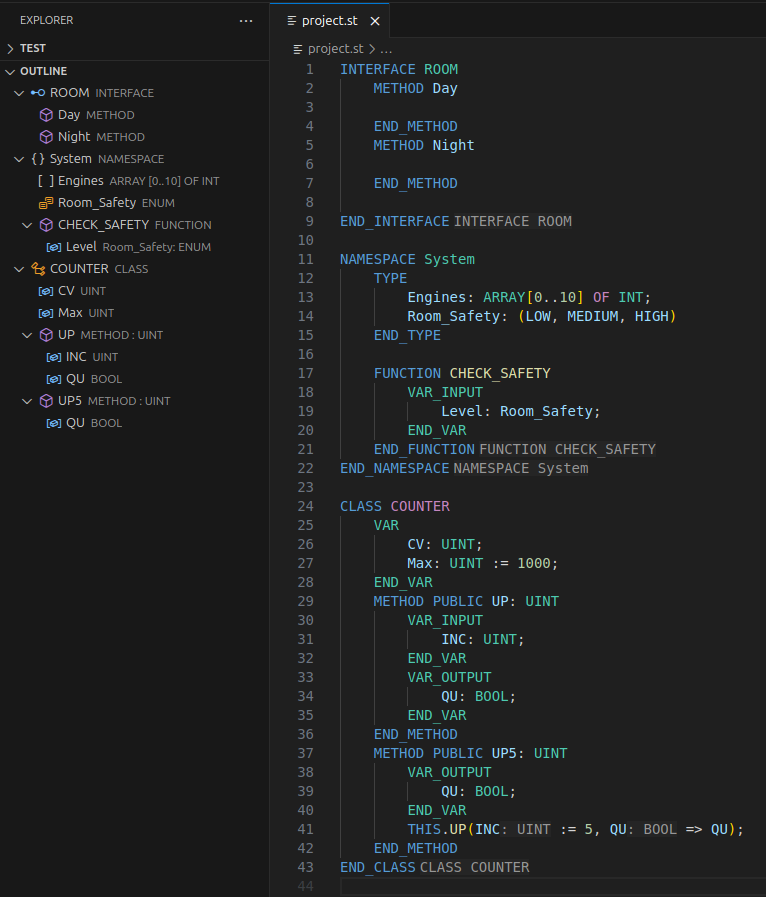
Documents symbols provide a list of symbols for the IDE's code outline, which gives a high-level overview of the source code.
This is a very common feature that many language extensions provide, but in our case AAC tries to provide more information about certain symbols, such as return type of FUNCTIONs and METHODs, or aliases.
For example here, the variable Level of CHECK_SAFETY function is referring to the enum Room_Safety.
AAC will display both the name of the type (Room_Safety) this variable refers to, and also the type itself (in this case, Enum).
Document symbols are also used to fulfill the Workspace Symbols LSP request.
Inlay Hints
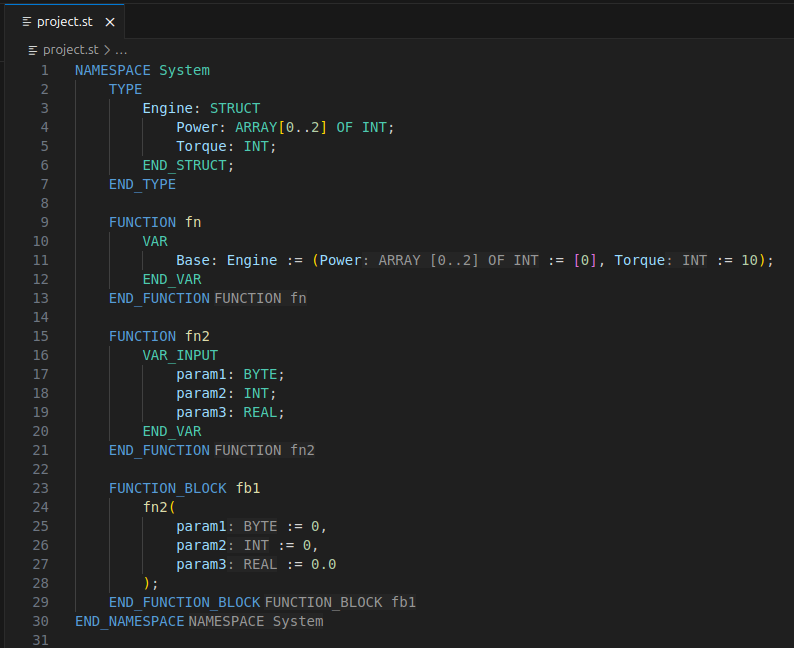
Inlay Hints are additional intra-text-information, AAC uses inlay hint in two places:
- As the end of a POU or NAMESPACE definition in order to quickly reminds the user in which contexts the end of a POU or NAMESPACE belongs to.
- Struct or function call parameters
Hover
AAC allows hovering of all items that can have a semantic meaning. Hovering an item will also highlight its definition if it's available in the current window.
Comment Index
AAC maintains a comment index that is lazily computed when the user is hovering a type or variable declaration.
A comment will be displayed for a given item if it's declared on top or at the right of it.
If the item has both top and right comments, the top one will have the priority.
Comments support markdown and the following syntax styles are allowed:
- Multiline C-style comment /* ... */
- Multiline Pascal-Style comment (* ... *)
- Single line // ...
AAC makes a difference between a comment that is used for a type definition and a comment for a type reusing it.
Implementations
In the case of Object Oriented programming features, any FUNCTION_BLOCK, CLASS, or INTERFACE that is extends/implemented by another POU will have a Code lens that shows how many POUs are using it.
Clicking on that lens will show the locations of those POUs are located.
Semantic Tokens
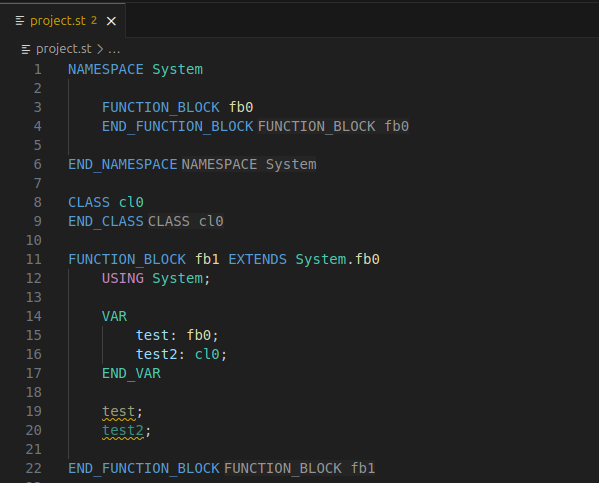
Semantic tokens are enhancing syntax highlighting by providing colors according to the semantic definition of a type. They overcome the limitations of a classic parser or text mate grammar that cannot achieve complete context awareness.
In the following example, all references to both fb0 and cl0 are blue.
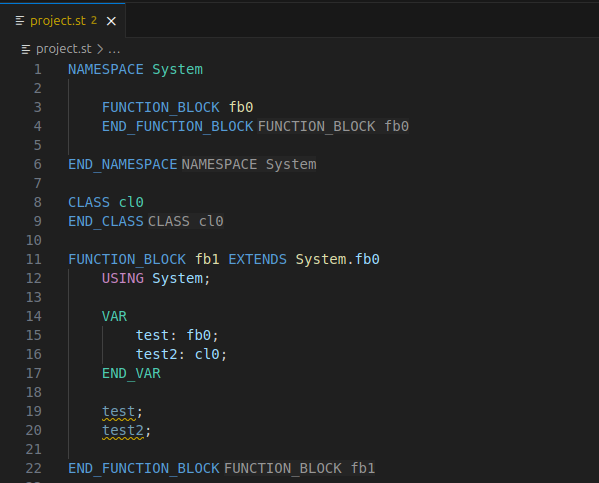
With semantic tokens enabled, the colors of variable types match their actual definitions. References to variables used in statements will also match the color of their definitions.
Folding Ranges
Folding ranges allow the user to collapse code regions in the IDE.
When folding items that have a semantic meaning, AAC will try preserve the name of the item being folded.
GoToDefinition Declaration
Going to definition or declaration will move the cursor to where a type is defined.
The difference between definitions and declarations is that definitions are pure type definitions, whereas declarations are used for variables.
Completions
Static Snippets
By static snippets we mean completions that always remain the same, e.g declaring a new POU or a variable section.
However AAC will try to show them only at locations where it makes sense to have them.
In the following example, we're declaring NAMESPACES and a FUNCTION.
- It makes sense to suggest a NAMESPACE when there's no context, or within an already existing NAMESPACE.
- It makes sense to suggest a FUNCTION inside a NAMESPACE.
- However, it does not make sense to suggest a NAMESPACE inside a FUNCTION.
Therefore typing 'N' inside FUNCTION should give no suggestions.
Signatures
When suggesting a function or method, AAC will automatically provide a signature snippet that includes all parameters of that function or method.
If the function or method has more than 5 parameters, AAC will try to split them into multiple lines for better readability.
Signature completions have (CALL) as a label to indicate they are callable items.
Fly imports
Since AAC supports multiple files and NAMESPACES, it can automatically suggest imports when the user is trying to use an item that is not yet imported in the current scope.
Fly imports completions are labeled with (USING) to indicate that selecting this completion will also add an import statement.
Type Checker
AAC has a type checker that runs alongside the LSP server.
The type checker currently has 80 error types.
Namespaces and files
AAC supports NAMESPACEs and automatically merges them across files. That means declaring a NAMESPACE in multiple files will result in a single NAMESPACE that contains all items declared in those files.
Therefore, duplicates across files are detected and reported by the type checker.
Type Checking
AAC listens to all file events coming from the LSP client, even if the files are not saved on disk.
That means the type checker fires on every keystroke:
Often, the type checker will try to provide additional information on why an error happened either by:
- Displaying related information about the items affected by an error.
- A note on why this error occurred and how the user should potentially fix it.
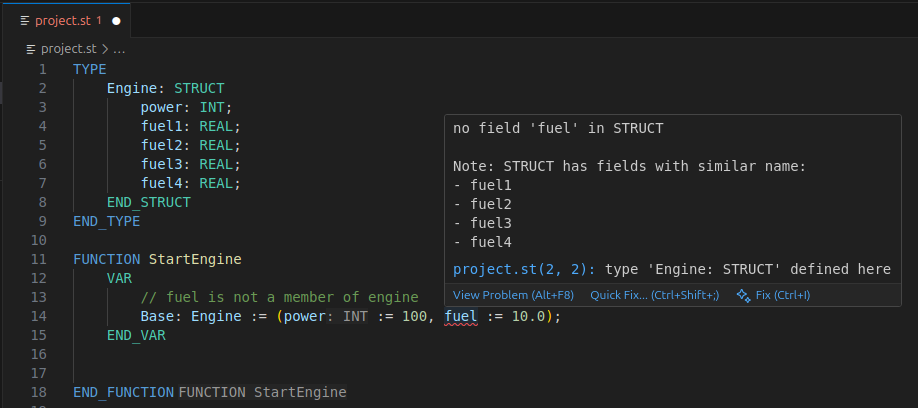
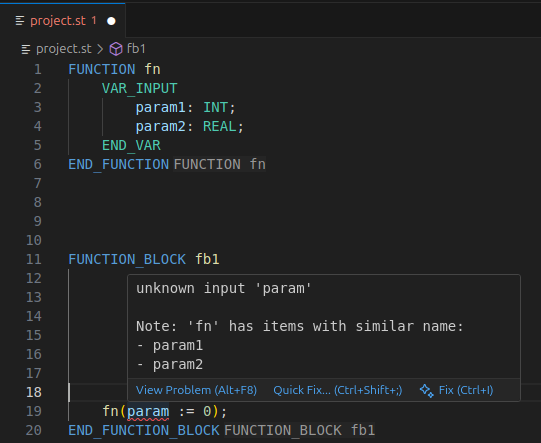
Fuzzy search recovery
For missing items, AAC will fuzzy search items available in scope and return those that match the missing item's name.
This also works for STRUCT fields and function calls:
Formatter
AAC has a built-in formatter that can be called at anytime by the LSP client.
However, it requires that the file has no syntax errors.
Semicolons
The parser tolerates missing semicolons ';' at the end of items, but it keeps compatibility with the IEC standard by allowing them at the right locations.
However, the formatter will automatically add missing semi-colons if it sees they are missing.
Inlining lists
The formatter will expand lists of parameters or values depending if a new line is present in the list.
In this example, it will keep everything in a single line.
But if a new line is present, it will add a line for each parameter: